
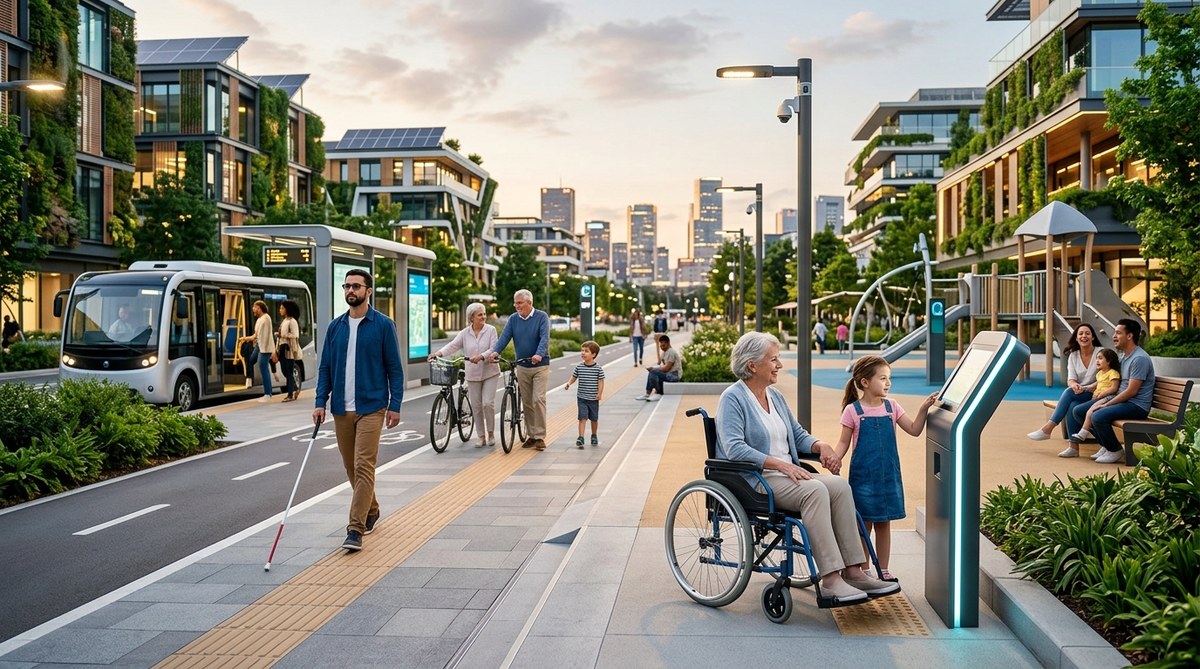
A city powered by sensors, data, and artificial intelligence sounds futuristic. But who gets to use that future? A sidewalk sensor that helps traffic flow smoothly is useless to someone who cannot cross the street. A public kiosk filled with city services is no help if the touchscreen is too high for a wheelchair user or the text is too small for an older adult. Smart city technology only works when it works for everyone. That is the core promise of inclusive smart city design. It is not an add on or a compliance checklist. It is the difference between a city that looks advanced and a city that truly serves its people.
Inclusive smart city design means building urban systems that work for people of every age, ability, and background from the start. This article gives planners and policymakers a practical framework: start with co-design, layer in universal technology standards, measure outcomes across demographics, and avoid common pitfalls like assuming one solution fits all. The goal is not just smarter cities, but fairer ones.
Start With People, Not Technology
Too many smart city projects begin with a cool gadget. A team picks a sensor, a platform, or an AI tool and then looks for a problem to solve. That approach almost always excludes people. Inclusive design flips the process. You start by asking who is being left out.
Older adults may struggle with apps that require small text or complex menus. Parents pushing strollers need curb cuts that actually connect to crosswalks. People with visual impairments rely on audio cues that many smart intersections lack. Each of these examples points to the same truth: inclusion is not a feature. It is the foundation.
Copenhagen offers a strong example. The city installed smart traffic lights that prioritize cyclists and buses. But they also added audible signals and extended crossing times for pedestrians with mobility challenges. The technology did not force a trade off between speed and access. It delivered both.
A Practical Framework for Inclusive Smart City Design
You need a repeatable process. Here is a five-step sequence that works for projects of any scale.
-
Map your excluded groups. Before you write a single line of code or install a single sensor, identify who typically gets overlooked in your city. Use census data, disability statistics, and community feedback to create a clear picture.
-
Co-design with real users. Bring older adults, people with disabilities, parents, and non English speakers into the design process early. Pay them for their time. Their lived experience will catch problems your team never saw coming.
-
Set measurable inclusion targets. Do not just say “we want to be accessible.” Define specific metrics. For example: “All new bus stops will have audio next stop announcements within 12 months” or “Public kiosk touchscreens will be reachable from a seated position.”
-
Test with diverse groups before launch. Run pilot programs with real users from the communities you want to serve. Collect feedback and iterate. Do not skip this step. A lab test cannot replicate real world conditions.
-
Monitor and adjust after deployment. Inclusion is not a one time milestone. Track usage data by demographic group. If you see a drop off among older users or people with disabilities, investigate and fix it.
Common Mistakes That Undermine Inclusion
Even well intentioned teams make predictable errors. The table below shows the most frequent mistakes and how to avoid them.
| Mistake | Why It Happens | Better Approach |
|---|---|---|
| Designing for the average user | Teams assume a middle ground that works for everyone | Design for the edges. Solutions for extreme needs often improve comfort for all users. |
| Skipping community input | Deadlines and budgets feel tight | Build co-design into the project timeline and budget from day one. It saves rework later. |
| Treating accessibility as a tech fix | Adding a screen reader or captioning after the fact | Bake inclusive features into the core architecture, not as an afterthought. |
| Using only digital channels | Assuming everyone has a smartphone or internet access | Keep analog options like phone lines, paper forms, and in person service counters. |
| Ignoring cost barriers | Smart city tools can be expensive | Offer free public WiFi, loaner devices, and reduced fare programs for transit tech. |
The Role of Universal Design Standards
Inclusive smart city design does not mean reinventing the wheel. Existing standards give you a solid foundation. The Web Content Accessibility Guidelines (WCAG) 2.2 provide clear rules for digital interfaces. The Americans with Disabilities Act (ADA) sets requirements for physical infrastructure. But you need to connect those standards to smart city systems.
For example, a smart parking system that shows available spots on a mobile app must also work for someone who cannot use a smartphone. That means installing physical signs with real time availability data at the entrance of every lot. It means ensuring the app works with screen readers. It means offering voice input for search.
Barcelona took this approach with its smart bus stops. Each stop includes real time arrival data on a large screen with high contrast text. The same information is available through an audio button. And the stops have tactile paving so people with visual impairments can locate them safely. The technology is invisible. The access is obvious.
“Inclusive design is not about special solutions for a few people. It is about better solutions for everyone. When you remove barriers for one group, you often improve the experience for many.”
* Kat Holmes, author of Mismatch: How Inclusion Shapes Design
How Data Can Help You Spot Gaps
Data is one of the most powerful tools for inclusive planning. But you have to collect the right data and use it responsibly.
Start with demographic data about who lives in and moves through your city. Age, disability status, language, income, and transportation mode all matter. Cross reference that data with how people use your smart city systems. Are older adults using the bike share program? Probably not, but is that because the bikes are hard to ride or because there are no tricycles or e assist options? Are non English speakers engaging with the city chatbot? If not, the language options may be buried too deep in the menu.
Privacy matters here. You do not need to track individuals. Aggregate data gives you the patterns you need. And always give residents the choice to opt out of data collection without losing access to city services.
For a deeper look at how data transforms urban planning, check out our guide on harnessing data analytics to transform urban living in smart cities.
Age-Friendly Features That Benefit Everyone
Designing for older adults often creates wins for every age group. Consider these examples.
- Longer pedestrian crossing times. Helpful for older adults, but also for parents with strollers, people using crutches, and anyone carrying heavy bags.
- Benches every 500 feet. Give older walkers a place to rest. Also welcome for tired parents, runners, and people enjoying a coffee outside.
- High contrast signage. Reduces glare for aging eyes. Improves readability for everyone on a sunny day.
- Simple interfaces on public kiosks. Fewer steps mean less confusion for all users, including tourists and children.
Singapore has embraced this philosophy across its smart nation initiative. The city state installed age friendly fitness equipment in public parks that tracks activity through a simple card system. No smartphone required. The same parks have shaded rest areas with USB charging ports and water fountains at multiple heights. The result is a public space that invites everyone to stay longer.
Designing for Cognitive and Sensory Accessibility
Smart cities often focus on physical mobility. But cognitive and sensory accessibility matter just as much.
For people with autism or anxiety, loud public announcements or flashing digital billboards can cause distress. Smart cities can use adaptive environments. For example, train stations could offer a “low stimulation” waiting area with dimmer lights and softer sounds. Wayfinding apps could include a “calm route” option that avoids crowded plazas.
For people with hearing loss, public address systems need visual backups. Station displays, app notifications, and even text message alerts can replace audio announcements. Some cities now use augmented reality wayfinding that overlays directional arrows onto a phone camera view. That helps people with cognitive disabilities follow routes more easily.
The concept of smart urban solutions transforming cityscapes of the future often includes these layered accessibility features, but they need to be planned from the start rather than added later.
Funding Inclusive Smart City Projects
Inclusive design can feel expensive upfront. But the long term savings are real. When you build a system that works for everyone, you avoid costly retrofits. You also unlock broader usage, which improves the return on investment for the whole project.
Look for funding sources that prioritize equity. The U.S. Department of Transportation’s Reconnecting Communities program, for example, funds projects that repair the harm caused by past infrastructure decisions. The National Institute on Disability, Independent Living, and Rehabilitation Research (NIDILRR) supports research into accessible technology. Many state level grants now require an equity impact statement.
Consider also the savings from reduced litigation. ADA lawsuits cost cities millions each year. Proactive inclusive design is the best defense.
For more on the policy side, read about 6 smart city policies that are redefining urban resilience in 2026.
Measuring Success Beyond Technology
How do you know if your inclusive smart city design is working? Do not just count sensors installed or apps downloaded. Measure outcomes.
- Are people with disabilities using public transit at higher rates than before?
- Do older adults report feeling safer crossing the street?
- Has the digital divide narrowed in low income neighborhoods?
- Are residents from different language groups accessing city services equally?
Surveys, usage analytics, and community feedback sessions all help answer these questions. Build a dashboard that tracks inclusion metrics alongside technical metrics. If the technology is performing well but inclusion numbers are flat, something is broken.
The city of San Jose, California, took this approach with its Digital Inclusion Fund. They tracked not just internet access but also digital literacy training and device ownership. The result was a more complete picture of who remained disconnected and why.
A Checklist for Your Next Project
Before you launch your next smart city initiative, run through this checklist.
- Did we include people with disabilities, older adults, and non English speakers in the design phase?
- Does every digital interface have an analog backup?
- Are all physical installations reachable from a seated position?
- Have we tested with users who have low vision, low hearing, or low digital literacy?
- Do our contracts with vendors require inclusive design standards?
- Have we planned for ongoing monitoring and community feedback?
If you answered no to any of these, go back and adjust. It is much cheaper to fix inclusion issues on paper than after installation.
Your City Can Be Both Smart and Fair
The smartest cities in the world are not the ones with the most gadgets. They are the ones where a grandmother, a child, a person using a wheelchair, and a recent immigrant can all navigate public space with dignity and ease. Inclusive smart city design is not a constraint. It is a creative challenge. It asks you to think harder, listen better, and build more thoughtfully.
Start small if you need to. Pick one intersection, one park, or one bus route. Apply the framework. Talk to the people who live there. Measure what changes. Then share what you learned with other teams in your city and beyond.
The technology will keep evolving. But the principle stays the same: a city that works for everyone is a city that truly works.








Leave a Reply